Archiving Trigger: Event-based
The event-based archiving trigger automatically creates archive jobs whenever configured Moodle events occur, e.g., when a student submits a quiz attempt or when an assignment submission gets graded.
Instead of archiving the whole activity, the created archive job only targets the specific object that is referenced by the event (e.g., the submitted quiz attempt or the graded assignment submission). This allows to archive individual attempts or submissions in a timely manner, right after they were created or changed, without having to wait for a scheduled run or manual user interaction.
Plugin must be configured before use
To prevent accidental creation of a large number of archive jobs, this archiving trigger is disabled by default. Please configure it as described below and only enable it after you have verified your configuration.
Configuration
All settings of this archiving trigger can be found at Site administration / Plugins / Local plugins / Archiving / Archiving triggers / Event-based.
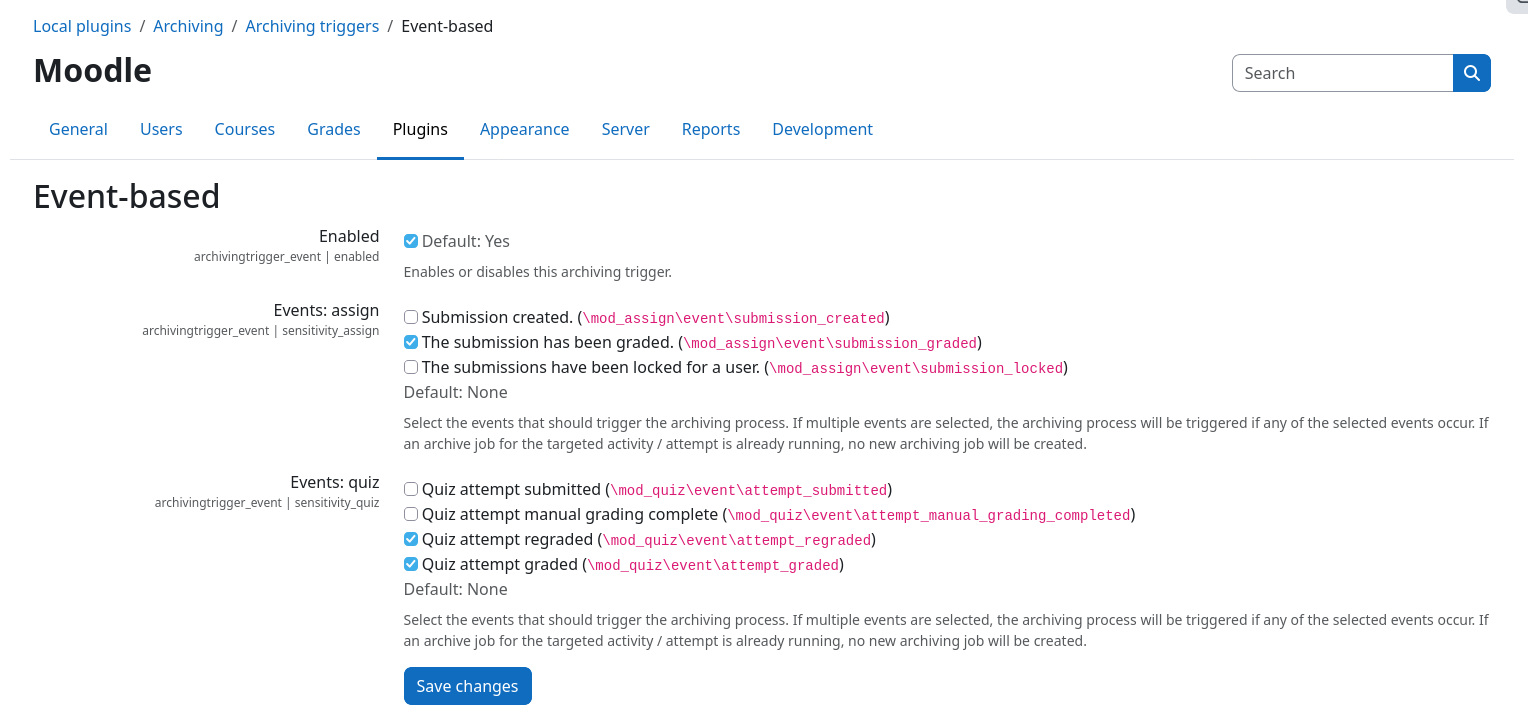
Selecting events
For every enabled activity archiving driver that supports event-based archiving, a separate event selector is shown (e.g., Events: quiz for quizzes). It lists all Moodle events that can be used to automatically trigger new archive jobs. If multiple events are selected, an archive job is created whenever any of the selected events occurs.
The following events are currently supported:
| Activity | Event | Archived object |
|---|---|---|
| Quiz | \mod_quiz\event\attempt_submitted |
The submitted quiz attempt |
| Quiz | \mod_quiz\event\attempt_graded1 |
The graded quiz attempt |
| Quiz | \mod_quiz\event\attempt_regraded |
The regraded quiz attempt |
| Quiz | \mod_quiz\event\attempt_manual_grading_completed |
The manually graded quiz attempt |
| Assignment | \mod_assign\event\assessable_submitted |
The submitted submission |
| Assignment | \mod_assign\event\submission_graded |
The graded submission |
| Assignment | \mod_assign\event\submission_locked |
The submission of the locked student |
Limiting the scope of activities
Like the scheduled trigger, the event-based trigger only creates archive jobs for activities that reside within courses that are marked for archiving. The archiving scope is controlled by the Course categories setting that can be found in the core plugin common settings page: Site administration / Plugins / Local plugins / Archiving / Common settings.
Archive job settings
Archive jobs that are created by this trigger use the default values of the respective activities archive job presets. Make sure to configure the job presets according to your needs (e.g., storage driver, retention time, file naming patterns, ...) before enabling any events.
Duplicate prevention
Some events can occur multiple times in short succession, e.g., when a teacher grades a submission and then updates the grade again. To prevent the creation of redundant archive jobs, each archive job is assigned a fingerprint that is based on the targeted course, activity, job settings, and archived objects. If an identical archive job is still pending or currently being processed, no new archive job will be created.
Once the previous archive job has finished, the next matching event will create a new archive job again. This ensures that later changes, e.g., a regrading of a quiz attempt, are captured inside a new archive.
Traceability
Each archive job created by this trigger records the Moodle event that caused its creation, as well as the IDs of the targeted objects (e.g., quiz attempt IDs or assignment submission IDs), inside its job logs. The used archiving trigger can furthermore be found in the job metadata table on the job logs page.
Combining triggers
The event-based trigger can be used alongside all other archiving triggers. You can, for example, archive every quiz attempt right after its submission using this trigger, while still allowing teachers to manually create full archives of an activity or creating them automatically on a schedule.
-
The
attempt_gradedevent is only available in Moodle 5.0 and newer. In Moodle 4.5, grading of quiz attempts is covered by theattempt_submittedevent. ↩