Automatic Deletion of Archive Files
Created archives contain personal data that often must not be kept longer than a defined retention period. To comply with legal constraints and data protection regulations (e.g., GDPR), archives can be deleted automatically after a configurable retention time has passed. Automatic deletion is configured individually for each archive job and equally applies to all artifacts that were created by the respective job.
How it works
Whenever an archive job artifact is created, the desired retention time is added to the current time. The resulting date is then stored as the expiration date for every artifact of the job. Artifact files without automatic deletion never expire and are kept until they are deleted manually.
Artifacts with enabled automatic deletion are processed by the scheduled Delete expired artifacts
(classes/task/delete_expired_artifacts.php) task that periodically checks them for expiry and
deletes them from the respective archiving store once their retention period elapsed.
flowchart LR
    A[Archive job<br>created] --> B[Artifacts<br>stored]
    B --> C[Set expiration date =<br>now + retention time]
    C --> D{Scheduled task:<br>Is artifact expired?}
    D -- No --> D
D -- Yes --> E[Delete<br>artifact]Only the archived files themselves, including their associated TSP data, are deleted. The archive job, its metadata, and its logs are kept and remain visible on the course archiving overview page but can optionally be deleted manually at a later point in time.
Enabling automatic deletion
Automatic deletion can be enabled during archive creation by checking the Automatic deletion option in the Advanced settings section. Once checked, the Retention time option appears, which controls how long the archive is kept before it is deleted.
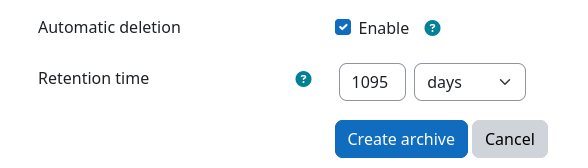
Enforcing a retention policy
Moodle administrators can define default values for both options at Site administration / Plugins / Local plugins / Archiving / Common settings. Both settings can moreover be locked by an administrator. This prevents users from disabling automatic deletion or changing the retention time during archive creation and therefore allows the enforcement of an organization-wide retention policy. See Job Presets for more details.
Checking the expiration date
The expiration date of each artifact is displayed on the artifact download page of the respective archive job. It shows the remaining time until deletion, whether the artifact is scheduled for deletion, or whether it has already been deleted.
Controlling the deletion schedule
Since expired artifacts are deleted by a regular Moodle scheduled task, the point in time at which they are removed can be controlled by adjusting the execution schedule of this task. To do so, a Moodle administrator has to follow these steps:
- Navigate to Site administration / Server / Tasks / Scheduled tasks
- Locate the Delete expired artifacts (
\local_archiving\task\delete_expired_artifacts) task and click the edit icon next to it - Adjust the schedule to your needs
- Save the changes
The default schedule of this task is:
| Minute | Hour | Day | Month | Day of week |
|---|---|---|---|---|
0 |
* |
* |
* |
* |
Artifacts are deleted during the first task execution after their expiration date has passed. Restricting the schedule therefore allows you to delay the deletion of expired artifacts to a specific date, e.g., only once per year.
Do not disable this task
If the task is disabled, no artifacts will be deleted automatically, regardless of their expiration date.
Example: Deletion on a fixed reference date
Some institutions are legally obliged to keep exam archives for a minimum number of years and to delete them on a fixed reference date afterward, e.g., at the end of an academic year. In this example, archives must be kept for at least 2 years and must then be deleted on January 1st of the year following the end of the retention period.
This can be achieved by combining the retention time with a custom deletion schedule:
- Navigate to Site administration / Plugins / Local plugins / Archiving / Common settings
- Check
job_preset_archive_autodeleteand lock it - Set
job_preset_archive_retention_timeto 2 years (730 days) and lock it - Save all settings
- Check
-
Navigate to Site administration / Server / Tasks / Scheduled tasks
- Edit the task
\local_archiving\task\delete_expired_artifacts -
Set its schedule to:
Minute Hour Day Month Day of week 0011* -
Save the changes
- Edit the task
Now, every archive expires 2 years after its creation. However, the expired artifacts are only deleted once per year, on January 1st. Archives created in the same year are therefore deleted together:
| Archive created | Expiration date | Deleted on |
|---|---|---|
| 2024-01-15 13:37 | 2026-01-14 13:37 | 2027-01-01 00:00 |
| 2024-07-01 10:42 | 2026-07-01 10:42 | 2027-01-01 00:00 |
| 2024-12-23 06:09 | 2026-12-23 06:09 | 2027-01-01 00:00 |
| 2025-01-10 16:32 | 2027-01-10 16:32 | 2028-01-01 00:00 |
Pitfall: Retention time starts with archive creation
As the retention time starts with the creation of the archive, an exam that took place in December but was archived in January of the following year will be deleted one year later than intended (see the last row of the table above). Make sure to archive your activities in the same year they took place.