Storage Driver: Local Directory
This storage driver stores all files inside a configurable local directory on the server. This not only allows you to easily store files outside your Moodle filestore, but also enables you to write files directly to a mounted network share (e.g., NFS or SMB/CIFS).
Configuration
Even though this storage driver is usable with its default settings, it is strongly encouraged to change the target directory according to your needs before use.
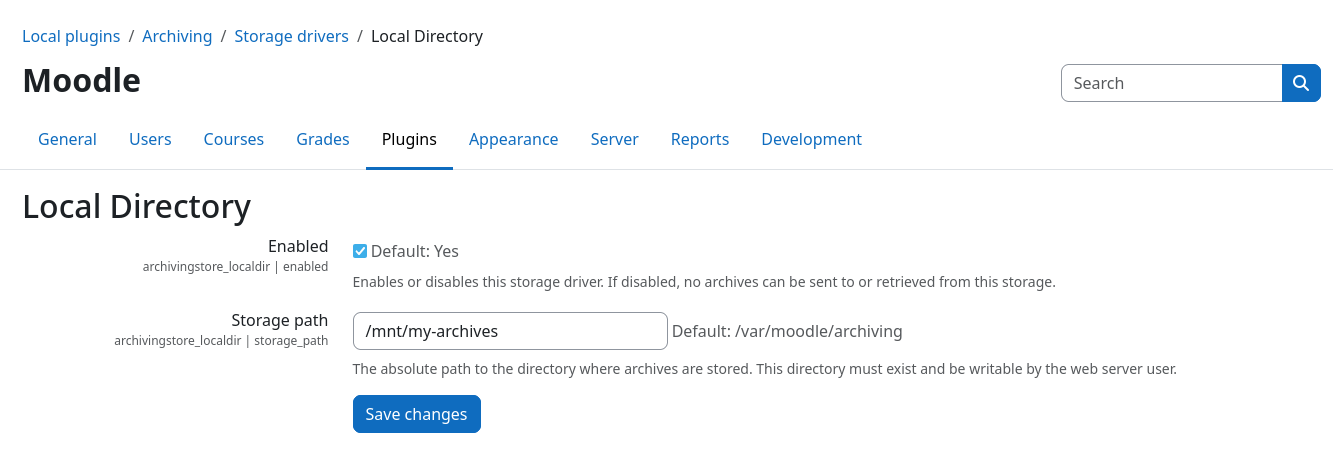
You can set the target directory via the Storage path field within the plugin settings page.
If you want to prevent users from storing archives on the local filesystem, you can disable this storage driver on the components overview page or via the Enable checkbox on the plugin settings page.
File structure
All files are grouped by archive job and stored inside subdirectories of the Storage path
directory. Subdirectories are automatically created for each archive job, called job-{$jobid}. All files
associated with the respective archive job are stored inside this subdirectory.
Example directory structure
/storage/path/
├── job-42/
│   ├── My Quiz_2026-01-01.zip
│   ├── backup_moodle2_My Quiz_2026-01-01.mbz
│   └── ...
├── job-43/
│   ├── Hard Assignment_2026-01-03.zip
│   ├── backup_moodle2_Hard Assignment_2026-01-03.mbz
│   └── ...
└── ...